Home › Transport › Tachograph downloads
Tachograph downloads: the 28 and 90 day rules explained
Missing a download is one of the easiest ways for an operator to fall foul of DVSA. Here's exactly when you have to download driver cards and vehicle units, and what to keep.
 TACHOGRAPHS
The short version
- Driver cards: download at least every 28 days, and on the driver's last day with you.
- Vehicle units: download at least every 90 days.
- Keep it: be able to show drivers' hours records to an enforcement officer for 12 months.
- Downloading isn't enough: you're also expected to check the data regularly and act on infringements.
Driver cards: every 28 days, and these other times
The 28 days are calendar days, not working days. You also have to download a driver's card:
- straight before they stop working for you. This applies to agency drivers too, which is the one most often forgotten.
- without delay if the card is damaged or faulty, as long as a download is still possible
- before you give up use of the vehicle, if the only way to get the card's data is through that vehicle's unit (for example, the card is stuck in it)
- as often as needed so no data is lost. A card holds roughly 28 days of average activity, then starts overwriting the oldest data. Drivers with lots of activity changes in a day (multi-drop work, for example) can fill a card faster, so download more often.
Practical tip: most operators download cards weekly or every couple of weeks rather than cutting it close to 28 days. It's easier to remember and means you spot infringements while they're fresh.
Vehicle units: every 90 days
Download the vehicle unit (the tachograph in the cab) at least every 90 calendar days, and also:
- without delay if you find out the unit is faulty, if it can still be downloaded
- if a repair centre can't download a broken unit, they should give you a certificate of undownloadability. Keep it for at least 12 months.
You'll need a company card (issued by DVLA in your company's name) to download a vehicle unit. Use it to lock in when you start using a vehicle, so your data is protected, and lock out when you sell it or hand back a hire vehicle.
How long to keep the data
| Record | Keep for |
|---|---|
| Drivers' hours records (tachograph data, charts, printouts) | Be able to produce them for 12 months |
| Certificate of undownloadability | At least 12 months |
| Working time records | 2 years after the period they cover |
Downloading isn't the same as checking
GOV.UK expects operators to make regular checks of the data to make sure the rules are being followed. In practice that means:
- run the downloaded files through analysis software
- look at the infringement report: missing mileage, breaks, daily and weekly rest, driving limits
- debrief the driver about each infringement, and get them to sign your record of it
- keep a note of what you did about it: retraining, a warning, or a change to scheduling
A traffic commissioner will want to see that cycle, not just a folder full of downloads nobody has looked at.
Common mistakes
- A leaver's card not downloaded on their last day, especially agency drivers.
- Vehicles that rarely move (spare or seasonal units) quietly passing 90 days.
- No company card, or a vehicle never locked in.
- Downloads stored but never analysed, or infringements found but never discussed with the driver.
- Relying on memory instead of a written schedule with due dates.
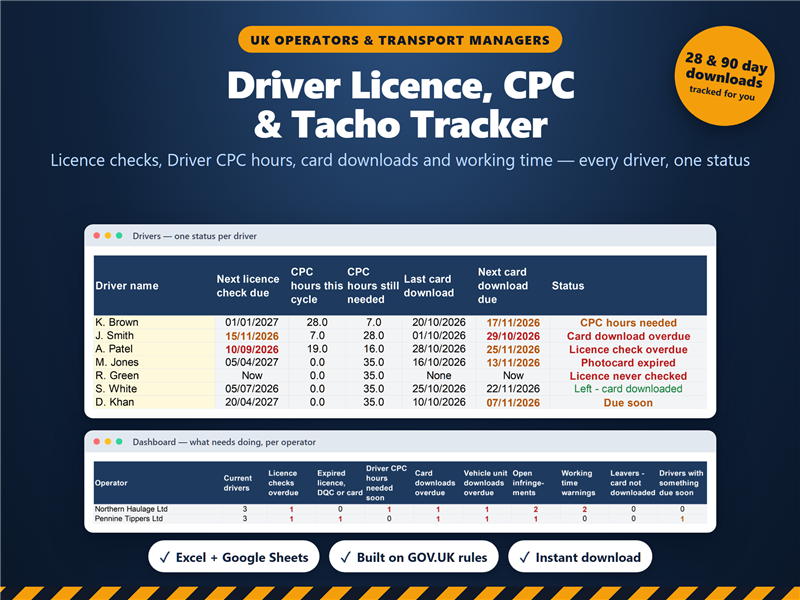
Our Driver Licence, CPC & Tachograph Tracker logs every card and unit download, works out the next due dates (28 and 90 days), flags leavers whose card hasn't been downloaded, and tracks infringement debriefs. Excel and Google Sheets.
See the template on Etsy